Micrographics
Create editorial posters with generative layouts, reusable templates, and direct canvas editing.
Start from this app
Run the CLI. Paste the copied command into your terminal.
Name your project. Choose a name, then let the CLI install the app and its dependencies.
Start building. Open the generated project and make it your own.

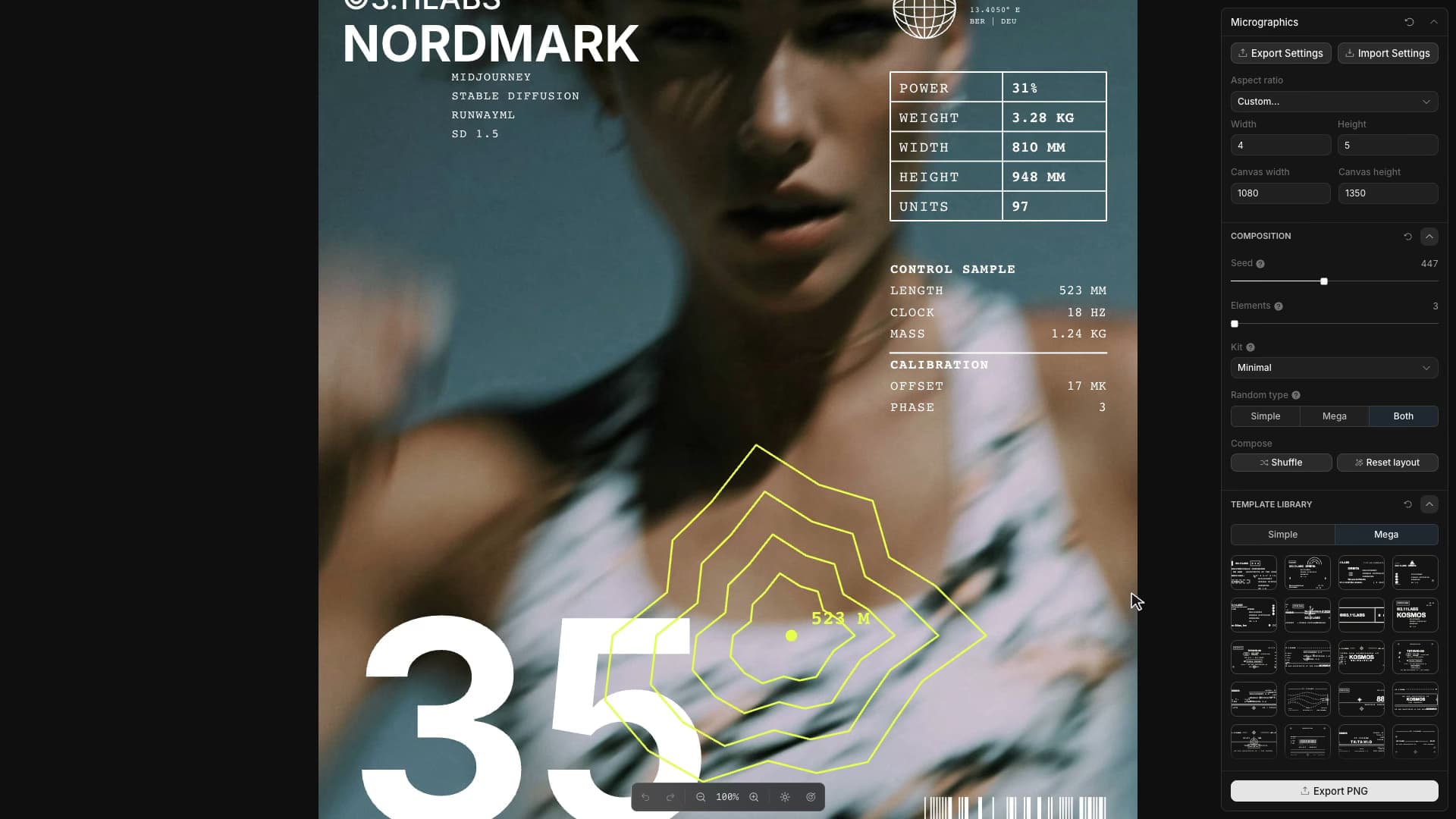
Micrographics leaves room to edit what it generates. Its template library contains small diagrams, labels, scales, symbols, and blocks of type. A seeded generator can arrange them into a poster, after which individual elements remain selectable on the canvas.
You can move a group, resize one element, edit a text fragment, or drag another template into place. Those edits pass through Toolcraft's command history. The generator supplies an arrangement; the canvas exposes its constituent pieces, so revising one detail does not require starting again with a new random result.
Before an arrangement reaches the canvas, the generator tries positions on a grid inside the poster margins and scores them for overlap. If an element still cannot find space, it tries again at a smaller size. The same seed and composition settings reproduce the arrangement, including the content inside each diagram.
Manual edits are stored against each element's identity. A moved or rewritten element replaces its generated counterpart; a deleted one stays marked as removed. Individual colors can override the poster's shared ink, while untouched elements continue to use it. This leaves room for a local exception, such as one differently colored label, without turning every element into a separate styling task.