Building a mini app to showcase logos on a rotating sphere for a website bento card
The story of a design idea our team at Pixel Point couldn’t quickly test in Figma, and how we used Toolcraft to try it.
Start from this app
Run the CLI. Paste the copied command into your terminal.
Name your project. Choose a name, then let the CLI install the app and its dependencies.
Start building. Open the generated project and make it your own.

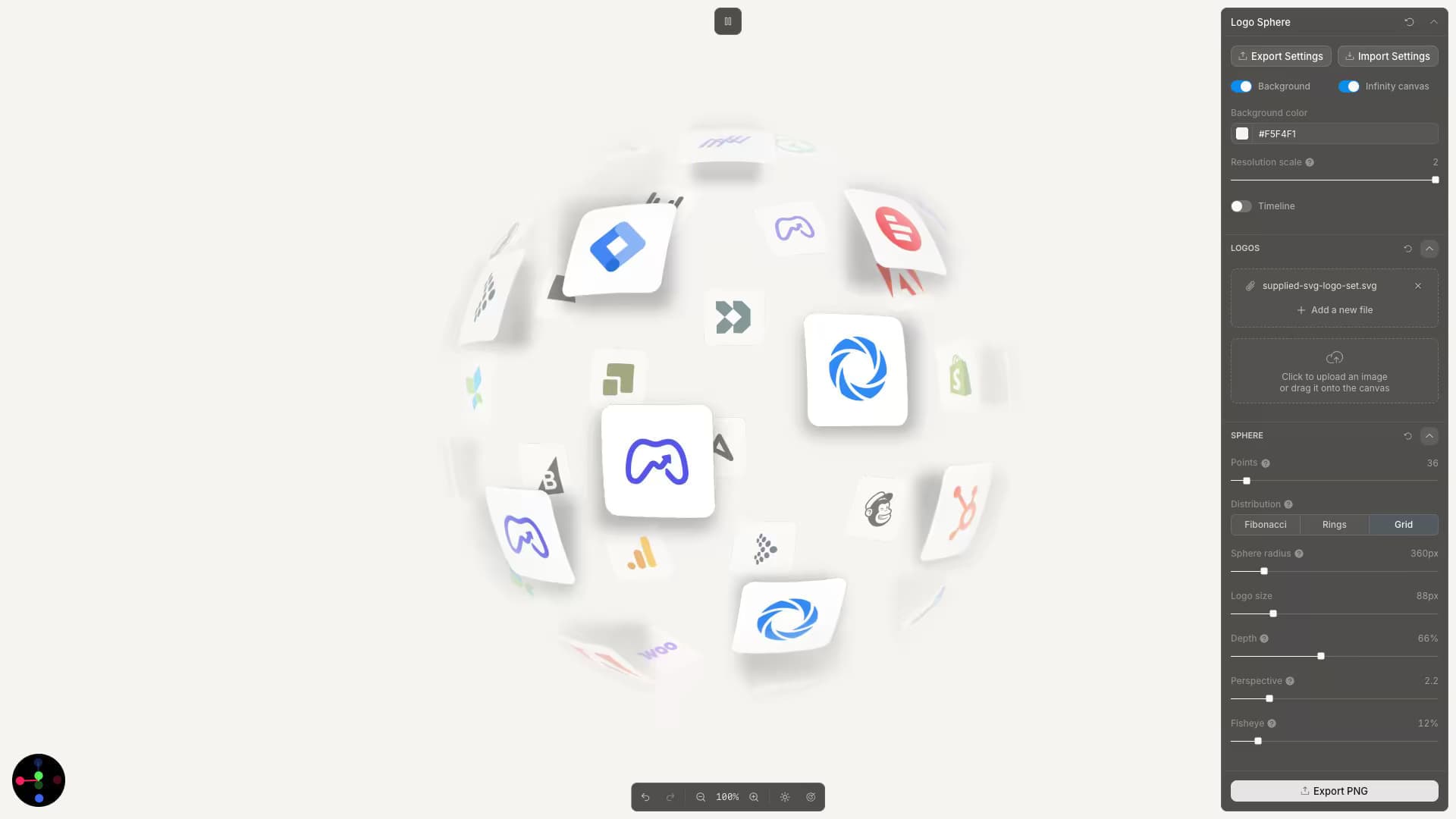
We were working on a new website design, and one of the bento cards needed to display a large set of logos representing the client's integrations. The client liked how Ramp presented logos on its website and asked for something similar. We didn't want to copy it directly. The idea was to wrap the logos around a sphere to add depth, with the possibility of making the card interactive.
The idea felt promising, but how would you even sketch it in Figma? There's no way to upload a batch of logos, arrange them on a sphere, quickly adjust the gaps, logo sizes, and shadows, and experiment with the animation to understand whether the idea is worth investing in. That's where Toolcraft comes in handy.
We decided to build a custom application with Toolcraft, starting with a new project using the Toolcraft CLI:
Then we used Codex to build the app itself. Our initial prompt looked like this:
Initial prompt:
Build an app that will let me upload multiple logo images and arrange them across a three-dimensional sphere. Make the logos conform to the sphere’s surface, as if they were wrapped onto it. The sphere should rotate automatically and remain interactive, so I can drag it to explore the logos from different angles. Figure out which controls would be most useful for experimenting with the sphere’s composition, density, depth, perspective, styling, and movement.
Of course, we didn't get a perfect result from a single prompt, but it was already clear that a few more iterations could get it into decent shape. I think it took around 10–15 prompts in total to reach the version of the app you can see in this example.
Getting there took a few hours. If that sounds like a lot, you're not spending all that time working on the app yourself. You can keep working on other tasks while the AI adjusts the solution, checking in from time to time to review the result and guide the next iteration.
By the end, we had an app that let us adjust every parameter precisely and animate the graphic. It also gave us a foundation for a quick handover: since it was already built in code, it would be easy for AI to transfer it into the actual website implementation.