Creating a custom app to design an animation for the showreel in Neon.com’s footer
Explore how Toolcraft can fit into your video production process.
Start from this app
Run the CLI. Paste the copied command into your terminal.
Name your project. Choose a name, then let the CLI install the app and its dependencies.
Start building. Open the generated project and make it your own.

At Pixel Point, we worked on a new update for Neon.com’s homepage. Neon provides serverless Postgres and backend services such as authentication and storage to help teams build and scale applications. As Neon expanded beyond Postgres into other infrastructure services, the old reel in the website’s footer no longer fully represented what the company offered. So we had to rebuild that video as part of the homepage update.
As usual, we started with the story: what we wanted to tell in the video and how to structure it. Once that structure was in place, we began brainstorming visuals, combining our own ideas with references from Pinterest. The footer wasn’t the place for an explainer video. We wanted a showreel or teaser that supported Neon’s brand and sparked interest in the product through keywords and visual metaphors that mattered to potential users. We built the story and visuals around that goal.
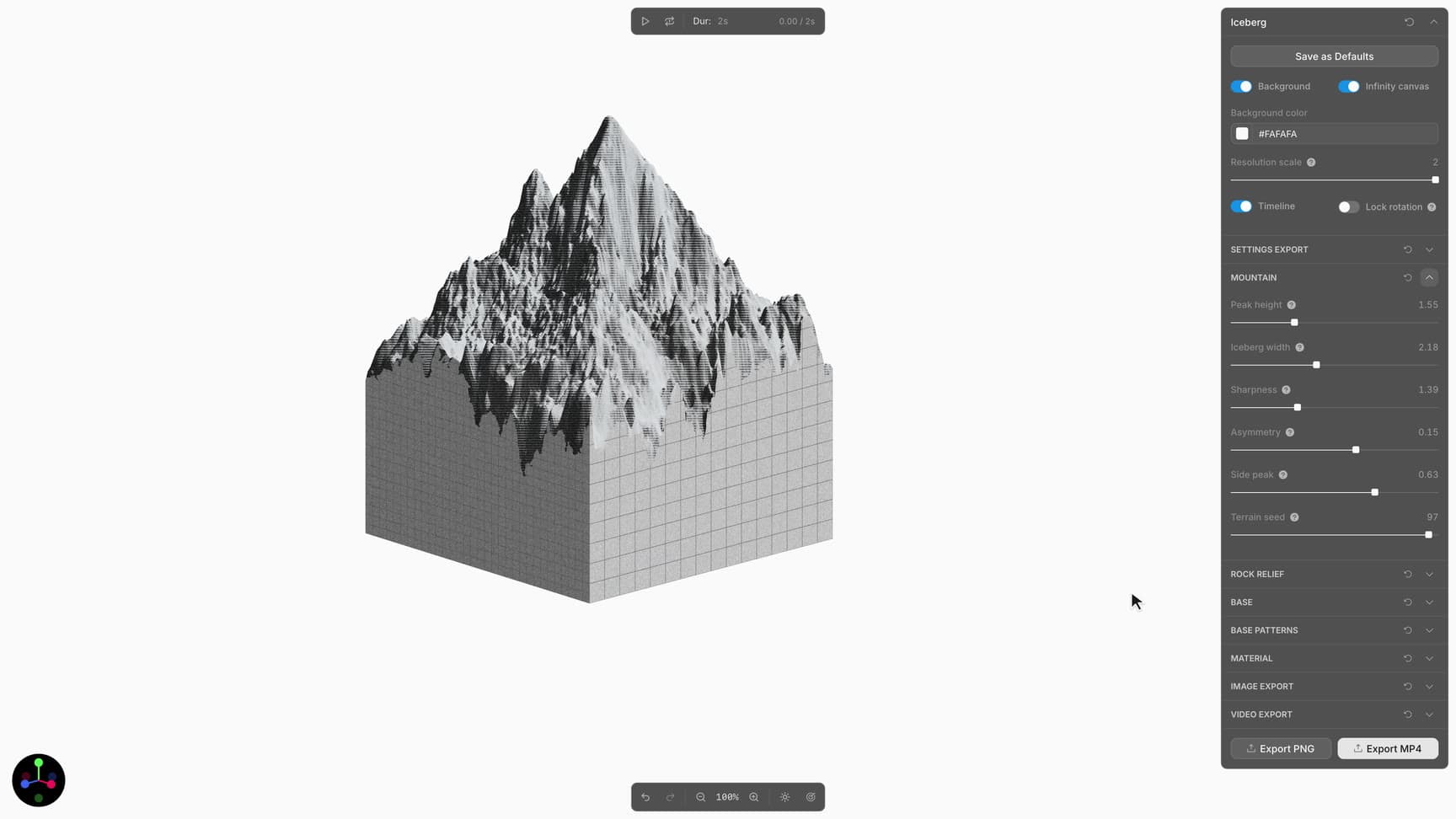
During that exploration, we came up with the idea of an iceberg or rock. The app you’re building would be just the tip, with layers of infrastructure beneath it: databases, storage, functions, and so on. We liked different details in several Pinterest references and wanted the graphic to combine 3D forms with a vector-like style.
But how would we even design it? Figma wasn’t suitable for this kind of artwork, and Blender would probably be more than we needed. That made Toolcraft a perfect fit. We could build a fully custom app specifically for experimenting with this graphic and its style.
We started as usual by creating a new app with the Toolcraft CLI:
Then we sent our initial prompt in Codex:
Initial prompt:
I want to build an app with a 3D iceberg generator. It should look like a mountain on top and a cube underneath. Look at the reference: the boundary between the top and bottom is uneven. Give me topology settings that let me recreate it as closely as possible. I also want to rotate the object.
We used GPT 6 Astra in Extra High mode throughout the app’s development. Despite how complex the visual style looked at first, we found the right look and feel fairly quickly. In total, we spent around two to three days on the graphic, including the animation, which we also built entirely in Toolcraft.
That doesn’t mean we worked on this one task nonstop for two or three days. We kept working on other tasks while the AI developed the app, checking in from time to time to review the result and guide the direction. Once the environment was ready, the controls gave us the flexibility to quickly set up the look we wanted and adjust the details.